

Some of you reported difficulties using the automatic post to insert Alhabib islamic widgets in your blogs. Some got error messages, while the others reported failed notes. Still some others experienced other types of difficulties so that they cannot put the widgets automatically into their blogs.
So, there are many ways to Rome. In this tutorial, you will learn, step-by-step, how to display or insert the islamic widgets on your Blogspot blogs, manually.
Using the HTML Gadget
1. Copy the embed code for a particular islamic widget.
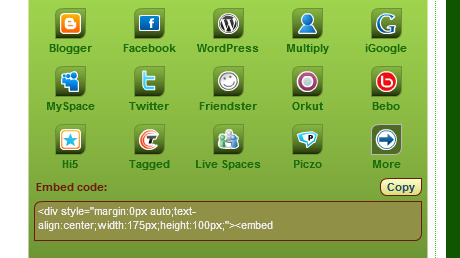 This code is available after you click the BLOG ME button on every widget configuration page. You can copy the embed code by clicking the text box or the COPY button.
2. Enter your Blogspot’s Dashboard.
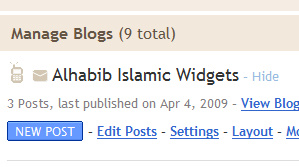 Visit www.blogger.com and enter your Dashboard by providing your Google account’s email and password. If everything is okay, you will be presented with a list of blogs that you can manage. Click the LAYOUT button on the blog list that you want to insert the islamic widget into. A diagram of your blog’s layout with its elements will be displayed.
3. Add a new Gadget.
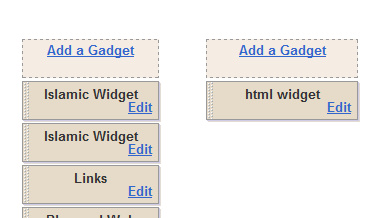 Look for an ADD GADGET button on your blog’s layout diagram. Depending on your theme, such button can be anywhere and more than one. Choose the one on which position you want to show the islamic widget.
A new window will be presented where you can choose HTML/Javascript Gadget as shown below. Click the PLUS button to continue with the insertion.
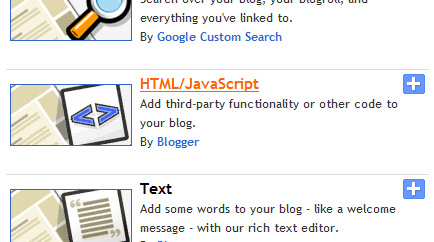
4. Insert the code in the Configuration Box.
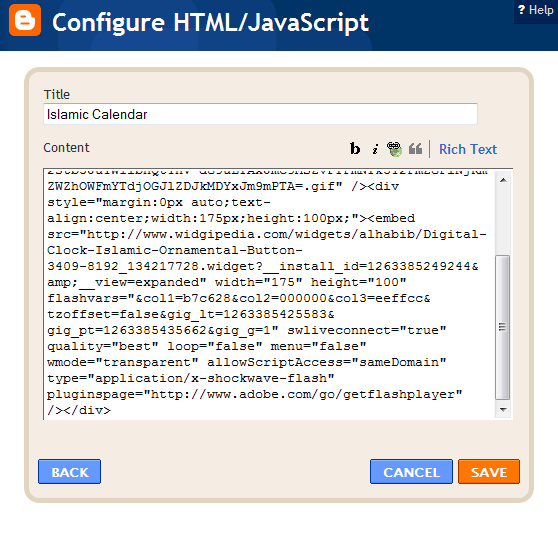 A new window with a box titled: HTML/Javascript Configuration will be presented. There you can give the widget a title which will be displayed along with it. In the content area, paste the embed code that you have copied in step 1. You can do it by pressing Ctrl-V or right-click with your mouse and click Paste on the displayed menu. Then press the SAVE button at bottom right.
5. Save the changes to your blog’s layout.
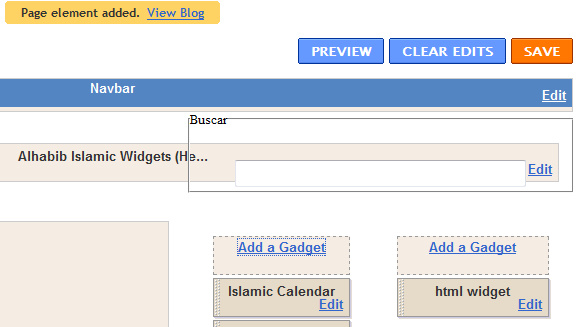 You will be directed back to the layout page of your blog and a message will tell you that a new element has been added. The newly added gadget will be represented by the title that you have given in the previous step.
On the top row, you have the choice to PREVIEW your changes. If you are satisfied, do not forget to SAVE the modified layout.
Ok, that is all the steps that you need to take to manually inserting the islamic widget on your blogspot blog. I hope I am clear enough in explaining.

hiiiiiii h r you
I am fine … 🙂 I was just surfing internet in regard to Islamic gadgets .. i have seen your blog .. And from there I got an idea to make my own website and made a show room of Islamic gadgets.
Regards
coba langsung di masukin htmlx sekalian!!
whenever i click the 'blog me' button, it didn't even pop out. i know i had waited, until my lptop's screen turned black several times but still i didn't get the embedded code. i've been doing these for the past months but still can't access the code. i like your gadgets so much and i wanted to put it into my blog but the embedded code just don't appear. Are there any other ways? or i guess it's just not my luck…huhu~
With what browser did you open the page. It requires javascript and flash plugin, which are usually installed or turned on by most browsers.
Alhabib Islamic Web Service
https://www.al-habib.info
salam aleikum me gustaria como puedo caragar estos gadgets a mi espacio hotmail ya llevo intentando muchos dias y no puedo porfavor me lo explicas gracias
thank you for the instructions
MÃ…LERI
why blogger asking now to add title in adding new widgets in title section i am sad 🙁
when i post it in my profile the flash is not changing unless u press the i butten i wana fix this
Thanks for the instructions, it really helped! 🙂
salaam i want to post calender in face book account pls help me
As-Salaam Alaikum
how i can have Islamic Gadgets on my desktop
Have to say – thank you so much for this blog!!
You don’t often find a good blog which isn’t just full of spam anymore 😛
I’ve already bookmarked it so I can come back to it! 😀
Wow
I´ts shrewd to expect we make evolved so in so lowercase case when compared to opposite time frames. Ending 10 were conclusive when it comes to profession and gadgets
kode HTML nya mana????
Assalaam Alaikum can we use on wordpress ? or can you compatible with wordpress 3.0
Thank you!
If you talk about the self-hosted wordpress, then I think you can put any HTML code on your TEXT widget?
https://blog.al-habib.info/insert-flash-widget-wor…
Thans a lot man
As-Salaam Alaikum
Thank you for great article but doesn't work for me,if give you my url,can you check for me ?
Thank you so much for all things..
These widgets are very helpful
Just think, in three years there will be handheld devices outperforming today's laptops and netbooks. Pretty amazing how fast things are developing these days.
Certainly many people had been waiting on this nice gaget
It looks like a very useful gadget for many people!
Thanks pal. Good submissions you have here. Got some more websites to point to which have a bit more stuff like this?
Assalamu'alaikum Admin,
Saya sudah coba pasang kalender hijriyah di blog saya, tapi gagal. Mohon bantuannya, Terima kasih atas bantuannya…
Wassalam.
UNBELEIVABLE ! they sell PlayStation gor USD39.99 – I’m not sure why the price is sooo low but it’s real.Head to this blog http://playstation3usd40.blogspot.com/ and see your self….the original price was USD499.
Can I just say what a aid to search out someone who actually is aware of what theyre talking about on the internet. You undoubtedly know learn how to convey an issue to light and make it important. Extra people have to learn this and perceive this aspect of the story. I cant believe youre no more standard since you undoubtedly have the gift.
You can the link to your site here: http://pregtest.net/our-friends/
where are the embed code??
where are the embed code??
Jazakallah…. will try to apply your tutorial, its quite clear.. wish me luck, it will make my blog look beautiful..
Its to nice site
please visit it . http://islamicmessenger.blogspot.com
Nice one..! I like the way you guided and its really nice to add islamic widgets to our blogs..Thanks for sharing.
Could you share many more Islamic widget for blogspot?
Best Regards
it is great !
Hey, great for the instructions, this is a great gadget
Sauna Sauna imalatı kovası Sauna kum saati Sauna kokusu Sauna esansı Sauna malzemesi Sauna malzemeleri Buhar odası imalat malzemeleri ahşap sauna sanayi servisi montajı sauna bakımı
siteniz cok güzel olmuÅŸ, " http://www.ozmengeridonusum.com " hurda demir, hurda kağıt, kağıt geri dönüÅŸüm, hurda fiyatları, metal hurdası, hurda metal, hurda demir fiyatları
Your site was very nice, thank contributors…
شکریÛÛ”Û”Û”Û”Û”Û”Û”Û”Û”Û”Û”Û”Û”Û”Û”Û”Û”Û”Û”Û”Û”Û”Û”Û”Û”Û”
can u shear this code here>
I am pretty you can just click the BLOG ME button on the widget configuration page. Hope that helps.
http://webasif.wordpress.com/
Extra people have to learn this and perceive this aspect of the story.
im actually one of this "Some of you reported difficulties using the automatic post to insert alhabib islamic widgets in your blogs. Some got error messages, while the others reported failed notes. Still some others experienced other types of difficulties so that they cannot put the widgets automatically into their blogs" I would really appreciate your help. Keep it up…
Helpful post. The instructions are very well laid out. This is very inspiring for Islams out there and I'm pretty sure that lots are already encourage to o do this one. God job!
I am beginer blog. Thanks your tips
Could you share many more Islamic widget for blogspot?
Assalamualaikum…
Thank you for your article and widget. It is very clear tutorial and easy to follow. I have copied it into my blog.
Wassalam
Thanks, this can help me in the future for my sites!
Loving a post could be like giving an optimistic opt for change, I can like every post I like, but no loves could be wasted from me if I provide a good one to your website. I say to you right now, this has a good like from me.
I realy like your layout and coloring, alot of intresting reading here also. What do you think of my site? http://www.swtor-companions.info/imperial-agent.h…
Whoah this blog is magnificent i like reading your posts. Stay up the good paintings! You know, a lot of people are looking round for this information, you can help them greatly.
The blogger interface in google is a very user-friendly. Even if you are a newbie on this interface, you can easily maneuver on all the things that you want and need to post in your own blog account on blogger.com .
"Countdown" MERE BLOG ME ADD NAHI HO RAHA HAI, HAR BAR FAIL HO JATA HAI,
PLZ HELP
i got it,tq so much
I am new blogger. Thank you for your article and widget. It is very clear tutorial and easy to follow
Just to say…May you be blessed for sharing and teaching brother. Hope its ok..I have also pinned some of your quotes onto pinterest. Tq again.
Please offer an option to use a widget with no ads.
Currently a static ad shows whenever our webpage is opened, in the place of the calendar. User will need to refresh the page in order to get to the calendar.
I am new blogger. Thank you for your article and widget. It is very clear tutorial and easy to follow.Good
PLEASE UPDATE YOUR WIDGETS WITH OUR NEW CODES!
Visit our sites for your updated widgets…