
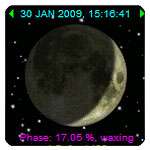
Another islamic calendar widget is released which displays the current phase of the moon. It can also be called an astronomy widget, since more detailed information about the moon are also given. Those that are inclined to astronomy or astrophotography might find such useful information as the age of the moon, the dates and times of last and next new moons as well as full moon.
The idea behind this design is that the islamic calendar is lunar based. It is tightly correlated with the phase or the calculated position of the moon. Even the Prophet Muhammad ordered muslims at that time to look for crescent moon to start the islamic lunar month. An order that is still practised by many muslims especially to determine the start and end of major islamic rituals such as ramadan and eids.
Ok, that’s enough for a reason. Now, here is the link to get the widgget and start displaying the ever changing phase of the moon on your blog or website:
Hope it is useful.

salaam
i like the new Moon Phase Widget,great job marshallah!
just wondering,how can i add it to my blog,on the left or right top corner?
thanks
LAPTOP GRATIS
Laptop GRATIS, tanpa bayar, cukup KLIK IKLAN 20 kali,
dalam 20 hari aja,dapatkan di sini: http://www.flaptops.50webs.com
At last! Someone who udnersatnds! Thanks for posting!
I have some used cars.Such as Carmy/Focus/Civic/Corolla,and all cars price only 1000 dollar.plz visit my blog:best used cars under 1000