To provide the best experiences, we use technologies like cookies to store and/or access device information. Consenting to these technologies will allow us to process data such as browsing behavior or unique IDs on this site. Not consenting or withdrawing consent, may adversely affect certain features and functions.
The technical storage or access is strictly necessary for the legitimate purpose of enabling the use of a specific service explicitly requested by the subscriber or user, or for the sole purpose of carrying out the transmission of a communication over an electronic communications network.
The technical storage or access is necessary for the legitimate purpose of storing preferences that are not requested by the subscriber or user.
The technical storage or access that is used exclusively for statistical purposes. The technical storage or access that is used exclusively for anonymous statistical purposes. Without a subpoena, voluntary compliance on the part of your Internet Service Provider, or additional records from a third party, information stored or retrieved for this purpose alone cannot usually be used to identify you.
The technical storage or access is required to create user profiles to send advertising, or to track the user on a website or across several websites for similar marketing purposes.



cmne nk ltk dlm blog ana ni??
Lihat tutorial dalam bahasa indonesia di: https://blog.al-habib.info/id/memasang-widget-alhabib-di-blogspot-blogger/
excellent…
Gmna cara mengaplikasikanx?
Salam sejagat, salam kash sayang…
Sudilah kalian semua ke http://ghoyatulinsan.blogspot.com utk kita berkongsi sesuatu yg myngkin telah t’cicir drpd pengajian era sekular ini, ke arah mengenali akan matlamat kejadian Adam a’laihissalam. sekian, wallahu a’lam…
cam ne nak post kat blog saya ni? tolong lah
macam mane nk letak kt wordpress?
There is a tutorial on that. Follow the How To link on top of this post or at the right sidebar.
cmne nk ltk kt blog saya nih??
HOw ro remove the message that displays when the mouse goes over the widgets.
sorry.. i can't understand the instructions.. how to put it to my blogger?
Are you making this up as you go along?
i don't get it …how to put th widget in sidebar…? thx
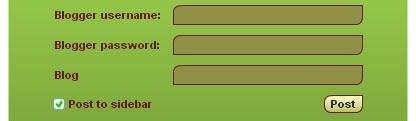
If adding to blogspot, just check the Post to sidebar, as pictured above.
If you want to add to your WORDPRESS blog, then you should follow this article: https://blog.al-habib.info/insert-flash-widget-wor…
i can’t fill the form,,, please suggest to me which one the link i must click…
nice i have put it in my blog http://princesshanako.blogspot.com
thumb up..
thanks for the information, will try to implement it in one of my blogger
I am filling in the form. but it keeps saying problem with target site. please help.anyone?
is anyone having the same issue?
me too.. posting failed…
how i get it?
thank you…. i will put this widget to my blog personal..
I could not apply this in my blog even I had tried many times. do you have any other ideas?
how to download Digital Clock Ornamental Button – Islamic Clock Widget.
Kalo bwt WordPress gmana?
kenapa postnya fail ye?